
Quick Urchin
UTM Links in Seconds
Quick Urchin
UTM Links in Seconds
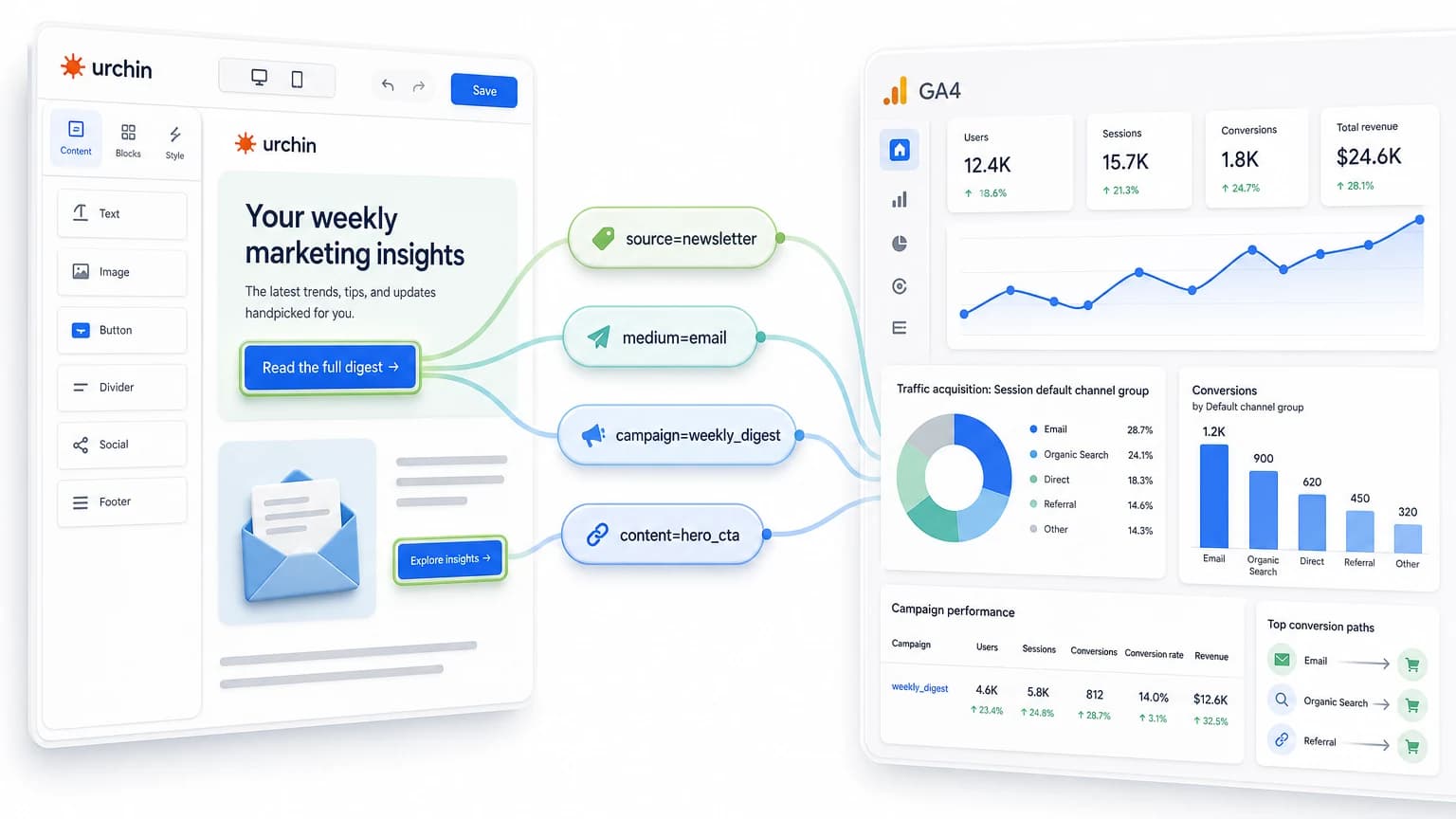
Email newsletters are one of the best places to use UTM parameters because every click starts from a controlled send. You know the list, the message, the offer, and the call to action. The job of your UTM tags is to preserve that context when the click reaches GA4.
A good email UTM link answers four questions:
Example newsletter link:
https://example.com/demo?utm_source=newsletter&utm_medium=email&utm_campaign=may_digest&utm_content=hero_button
Before you schedule a campaign, build the final URL with the free UTM builder so every email link uses the same naming convention.
For most newsletters, use utm_source, utm_medium, utm_campaign, and sometimes utm_content.
| Field | Recommended value | Example | Why it matters |
|---|---|---|---|
utm_source | Newsletter, list, platform, or automation name | newsletter, weekly_digest, customer_list, mailchimp | Identifies the sender or list behind the click. |
utm_medium | Always use the channel type | email | Keeps newsletter traffic grouped as email in GA4. |
utm_campaign | Send, promotion, launch, or lifecycle journey | may_digest, spring_launch, welcome_sequence | Groups related links from the same campaign. |
utm_content | Button, link placement, section, or variation | hero_button, text_link, footer_cta, product_card_a | Separates multiple links inside the same email. |
utm_term | Usually skip for email | vip_segment only if truly useful | Better reserved for paid search or explicit segment tests. |
The most important convention is utm_medium=email. Do not alternate between email, newsletter, e-mail, and mail. If you want to track a specific newsletter, use utm_source or utm_campaign instead.
Use these as starting points and adjust the names to match your team’s convention.
https://example.com/blog/utm-guide?utm_source=weekly_newsletter&utm_medium=email&utm_campaign=may_digest&utm_content=featured_story
Use this when a recurring newsletter links to editorial content. utm_campaign can be the send name or issue name, while utm_content identifies the article block or CTA.
https://example.com/pricing?utm_source=customer_list&utm_medium=email&utm_campaign=spring_launch&utm_content=primary_cta
This structure makes it easy to compare launch emails against paid social, organic social, and partner campaigns using the same utm_campaign value.
https://example.com/demo?utm_source=welcome_sequence&utm_medium=email&utm_campaign=trial_onboarding&utm_content=email_2_demo_cta
For automations, use utm_content to identify the step and placement. That helps you see which email in the sequence drives signups, demos, or upgrades.
https://example.com/checkout?utm_source=lifecycle_email&utm_medium=email&utm_campaign=abandoned_cart&utm_content=return_to_cart_button
Lifecycle campaigns often run continuously, so descriptive campaign and content names matter more than dates.
If one email has several links to the same page, keep the same utm_source, utm_medium, and utm_campaign, then vary utm_content.
Example:
| Email placement | utm_content |
|---|---|
| Hero button | hero_button |
| Header text link | intro_text_link |
| Product card | product_card_1 |
| Bottom CTA | footer_cta |
| Image banner | image_banner |
This lets GA4 show which placement got clicks or conversions without splitting the entire campaign into separate campaigns.
Good email tracking depends on boring consistency. Pick a format before you send and use it everywhere.
Recommended rules:
utm_medium=email for every newsletter and automation link.utm_source for the newsletter/list/platform.utm_campaign for the promotion, send, or lifecycle journey.utm_content for buttons, placements, variants, and email steps.You can draft the shared rules in the UTM naming convention generator before you create the final newsletter links.
A clean naming pattern might look like this:
utm_source=weekly_newsletter
utm_medium=email
utm_campaign=2026_05_digest
utm_content=hero_button
After someone clicks a tagged email link, GA4 can use the parameters in acquisition reports. You will usually look at:
weekly_newsletter / email.utm_campaign.utm_content.This is where the naming work pays off. If every email uses utm_medium=email, GA4 can group email traffic cleanly. If every email uses a different medium value, your reports become noisy.
utm_source to the newsletter, list, platform, or automation name.utm_medium to email.utm_campaign to the send, promotion, or automation campaign.utm_content for every unique button, section, or link variation.newsletter as the mediumThis splits email reporting. Use utm_medium=email, then use utm_source=weekly_newsletter or utm_campaign=weekly_digest to capture newsletter detail.
Do not copy a tagged URL from last month and only change the visible button text. Start from a clean URL or use a builder so stale campaign values do not leak into the new send.
If multiple links belong to the same email send, keep the campaign value consistent and vary utm_content instead.
Email builders, link shorteners, and redirect tools can change URLs. Always send a test email and click the final link before publishing.
Do not include email addresses, names, or private IDs in UTM values. UTMs can appear in analytics, logs, screenshots, and shared URLs.
Usually no. UTM-tag the marketing links where campaign attribution matters. Avoid adding marketing UTMs to unsubscribe, preference center, login, billing, or internal account links unless you have a specific measurement reason and privacy review.
The simplest pattern for email newsletters is:
utm_source=your_newsletter
utm_medium=email
utm_campaign=your_send_name
utm_content=button_or_section
Use the free UTM builder to generate the final campaign URL, copy it into your email platform, and keep a consistent naming convention across every send.